
SECURIX Mobile - Get APK
You'll be able to download in few seconds.
Publisher Description
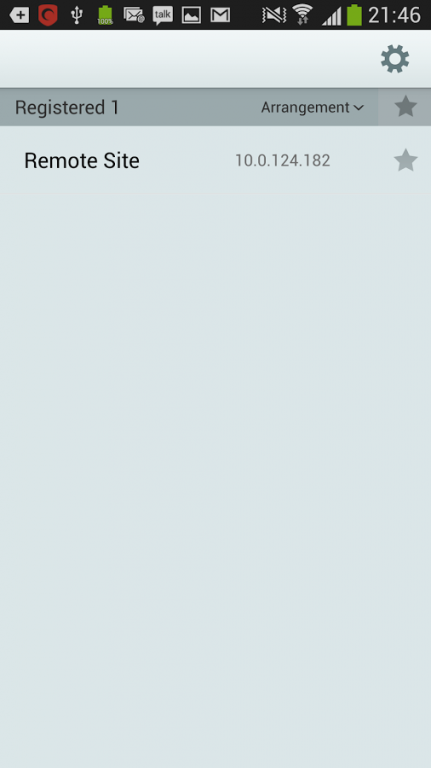
SECURIX Mobile helps monitor your home and business. With world top qualtity security products and advanced technology of SECURIX, you are able to remotely view, playback and control your cameras from Android phone or Android tablet.
* The versions of Android SECURIX Mobile has been tested on :
- 5.0.x(Lollipop)
- 4.4.x(Kitkat)
- 4.1.x ~ 4.3.x(Jelly bean)
- 4.0.x (Ice Cream Sandwich)
- 3.2 (Honeycomb)
- 2.3.x (Gingerbread)
--------------------------------
SUPPORTED DVRS
--------------------------------
* SECURIX SML4
* SECURIX SME4
* SECURIX SME8
* SECURIX SMC4
--------------------------------
KEY FEATURES
--------------------------------
* Live video feed of your cameras connected to SECURIX DVR
* Search and playback of the footage recorded on your SECURIX DVR
* Calendar Search with specific Date and Time
* Event Search with Motion detected footage
* Take advantage of Push Notification for Motion detection
* Auto-rotating screen to a landscape and portrait position
* Single-camera-view, 4 or 16-camera-view selectable
* Swipe in single-camera-view to select another camera.
* DVR list for easy access to multiple DVRs (SECURIX product only)
* Multiple camera support from 4 to 32 channels per DVR
* Easy connection using SECURIX DVR Name Service(DVRNS).
* Use the customed DVR name you have registered on your SECURIX DVR.
* Numerical display to show how much data is being received.
Pan, Tilt and Zoom camera control (SME4 & SME8 only)
*****************************************
- Control your PTZ camera in all 8 directions.
- Tap on the arrow button on screen to pan or tilt
- Swipe on the screen to change the camera direction
- Zoom in and out (if supported by camera)
- Adjust Focus Near/Far and Iris Open/Close
- Go to Preset positions (if configured in DVR)
Version history
## 3.1.1.3010100(AND3115)
improvements
- bandwidth limit (Watch : lower bitrate stream selected automatically, Search : Intra frame based search)
- more specific notification for DDNS disconnection reason
- password lock
- drawing in original resolution on 1 channel
bug fixes
- audio CODEC G726 related issue
- green screen from some video CODEC issue
- wrong watch port enterable when editing remote site
## 3.0.6.3000600(AND3053)
- Fixed abnormal termination after "Go to" on Search screen
- Fixed Search connection failure with FEN
- Fixed the problem that the records in 2013 cannot be accessed
- Fixed the problem with Audio button disabled for some ID-products
## 3.0.5.3000500(AND3049)
- fixed abnormal termination after "Remove All" on Push Messages
- fixed no incoming push notification
- fixed abnormal termination after connecting to some IDR models
- supports new model MN416/208
- tested on Android 4.4 Kitkat
## 3.0.3.3000301(AND3041a)
- fixed the problem with opening the setup file as an attachment in some email clients
## 3.0.3.3000300(AND3041)
- supports 720p/1080p device.
- supports Android version 2.3 and later with Jelly Bean 4.3
- ARMv5 based devices are not supported.
- supports NVR
- Applying a new skin
- Settings to export and import
- Favorite and sorting buttons on the device list
- Restrictions on cellular data usage
- 1 channel screenshot on Live/Search
- Changing between Live and Search connection
- Double tapping on the screen to change the aspect ratio
- Event query page
About SECURIX Mobile
The company that develops SECURIX Mobile is IDIS Co., Ltd.. The latest version released by its developer is 1.0 .
To install SECURIX Mobile on your Android device, just click the green Continue To App button above to start the installation process. The app is listed on our website since 2016-11-24 and was downloaded 0 times. We have already checked if the download link is safe, however for your own protection we recommend that you scan the downloaded app with your antivirus. Your antivirus may detect the SECURIX Mobile as malware as malware if the download link to com.securix.android.securixmobile is broken.
How to install SECURIX Mobile on your Android device:
- Click on the Continue To App button on our website. This will redirect you to Google Play.
- Once the SECURIX Mobile is shown in the Google Play listing of your Android device, you can start its download and installation. Tap on the Install button located below the search bar and to the right of the app icon.
- A pop-up window with the permissions required by SECURIX Mobile will be shown. Click on Accept to continue the process.
- SECURIX Mobile will be downloaded onto your device, displaying a progress. Once the download completes, the installation will start and you'll get a notification after the installation is finished.
Program Details
System requirements
Download information
Pricing
Version History
version
posted on 2016-11-24
[Additional feature],- Edit Box text size is not changed any more by Huge text on Android Settings.,[Bug Fixes],- Audio connection to old products via FEN failed
version 1.1.0
posted on 2011-05-11
Several fixes and updates
Disclaimer
External Download
We do not host SECURIX Mobile on our servers. We did not scan it for viruses, adware, spyware or other type of malware. This app is hosted by Galad and passed their terms and conditions to be listed there. We recommend caution when installing it.
The APK Download link for SECURIX Mobile is provided to you by apps112.com without any warranties, representations or guarantees of any kind, so access it at your own risk.
If you have questions regarding this particular app contact the publisher directly. For questions about the functionalities of apps112.com contact us.
